When was a webpage modified?
Looking for last-modified data which is sometimes present
Working out the date of a web page can be useful (especially for prior art in patent cases, and for evidence in litigation), but it can also be difficult. Most of the time a useful page has a date on it of some kind which may be reliable. For others the Wayback Machine helps perhaps about half the time but it hasn’t got perfect coverage. There’s another tool that can sometimesThis is mainly directed to static web content, i.e. content stored as files on a server. A lot of web content is generated dynamically and isn’t stored as files in the same way. help fill the gap.
The Last-Modified header
When you save or edit a file on your computer, the system logs a “last modified” timestamp recording the change. This is also true for a lot of web content.
When your browser requests a page online, it sends an HTTP request and the server’s response includes a set of HTTP headers, with extra information alongside the web content itself. This often includes a Last-Modified header, a time and date stamp recording when the content was last changed on the server. The Last-Modified header is used by web systems to detect whether something has changed since it was last fetched (e.g. for caching and archiving), but it is useful evidence of modification or publication date.
A response containing one looks like this:
Last-Modified: Tue, 15 Oct 2024 09:32:00 GMT
It isn’t always reliable and there are lots of reasons that a webpage’s date might show as more recent than it in fact is. Some servers set it accurately, others might be generating content dynamically at the server and set it to the current date and time; or it might record the last time the server’s cache was refreshed. But it’s a useful point of information, and usually broadly reliable in the same way as other computer timestamp information.
Checking for Last-Modified Timestamps
To view in Chrome:
- Go the web page you’re interested in.
- Press
F12, opening the developer tools console. This allows viewing the normally-hidden metadata. - Choose the “Network” tab in the console.
- Refresh the page (pressing
F5), so the console can record the request and response traffic. - There will often be several files loaded (the web page itself; images; scripts etc): click on the one you’re interested in.
- Look for the
Last-Modifiedheader.
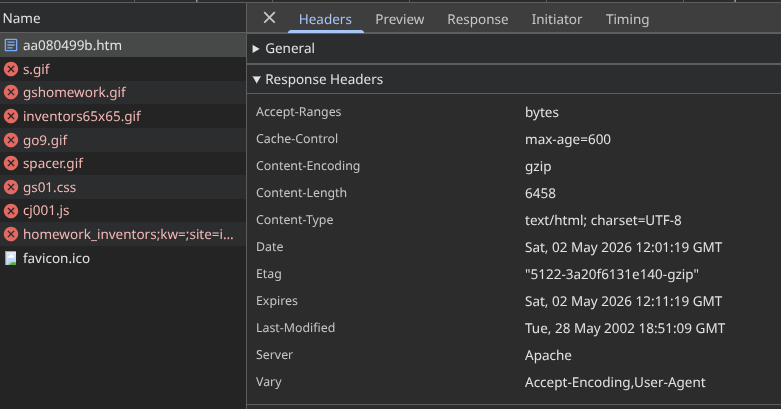
Here’s an example for http://landley.net/history/mirror/collate/aa080499b.htm, which shows that the page was last-modified Tue, 28 May 2002 18:51:09 GMT
The Wayback Machine
When the Internet Archive’s Wayback Machine snapshots pages it also preserves the HTTP headers that it saw at the time (i.e. those which accompanied the original response to the Archive, at the time when it retrieved the page in question). This is labelled with X-Archive-Orig- or X-Orig- prefix for example:
X-Archive-Orig-Last-Modified: Tue, 15 Oct 2024 09:32:00 GMT
To find these, load the archived version of the page on web.archive.org, then open DevTools and inspect the response headers as above. Look for any header beginning X-Archive-Orig-. This can help to establish a sequence of edits (or that there were no edits) between snapshot date and the present.